
Facebook Pixel

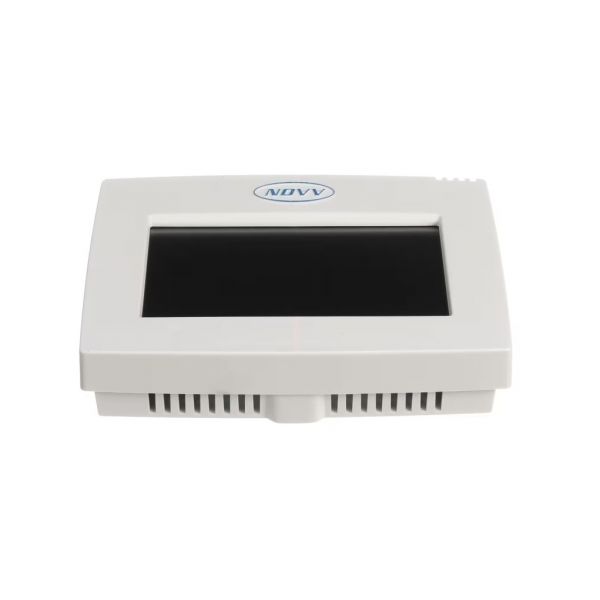
Aaon V62130 Touch Screen Mini Control

Special Price $1,051.76 Regular Price $1,167.45
In stock
SKU
V62130

The Aaon V62130 Touch Screen Mini Control is a tiny and easy-to-use device for managing HVAC systems. It has a touch screen interface that enables for easy management of many features such as temperature settings, fan speed, and mode selection. This tiny control is compatible with a variety of Aaon HVAC products, including air conditioners, heat pumps, and rooftop units. The Aaon V62130 Touch Screen Mini Control provides precise control over your HVAC system and has various advantages. Overall, the Aaon V62130 Touch Screen Mini Control improves the user experience and could lead to a more efficient and comfortable atmosphere.

https://www.partshnc.com/media/catalog/product/v/6/v62130.jpg

Product Overview:
Maintaining direct, intuitive control over unit operation and system settings is essential for managing indoor air quality and energy consumption in commercial HVAC environments. The Aaon V62130 Touch Screen Mini Control is an OEM user interface designed to provide clear, accessible monitoring and setpoint adjustments for compatible HVAC controllers and equipment.

Interface Operation:
This touch screen display connects directly to the system's primary control board to read operational data and transmit user inputs. By providing a clear digital display, it allows operators to inspect system status, adjust temperature and airflow setpoints, and review diagnostic feedback, helping maintain stable indoor conditions without requiring complex setup procedures.

Replacement Guidelines:
Replace Aaon V62130 when the screen suffers physical display damage, unresponsiveness to touch input, or persistent communication loss with the main control module. Disconnect power to the control circuit before removing or replacing the unit, and ensure installation is performed by a qualified HVAC technician. Before ordering, verify part number alignment, connection wiring styles, and main controller board compatibility.

Common Failure Symptoms:

  • The screen remains completely dark or unlit despite active low-voltage power supply to the unit.
  • The touch interface fails to register screen presses or incorrectly interprets user touch coordinates.
  • The display indicates a persistent communication error when attempting to sync with the main board.
  • Screen readout becomes corrupted, scrambled, or shows unreadable characters during operation.

Equipment Compatibility:
The Aaon V62130 Touch Screen Mini Control (Part Number: V62130) is compatible with designated Aaon rooftop units, air handlers, and HVAC systems utilizing compatible Aaon microprocessors and control boards. Always verify part number V62130, equipment model designations, and software/firmware communication requirements against manufacturer documentation prior to replacement.

Technical Specifications:
Brand: Aaon
Part number: V62130
Product Type: Touch Screen Mini Control / User Interface

Write Your Own Review
You're reviewing:Aaon V62130 Touch Screen Mini Control
Your Rating
Customer Questions
What maintenance is required for the Aaon V62130 Touch Screen Mini Control?

Keep the touch screen clean and free of dust using a soft, dry cloth. Inspect wiring and connections regularly to ensure proper functionality. Avoid exposure to moisture or extreme temperatures. Proper maintenance ensures accurate readings and reliable operation.

What are common issues with the Aaon V62130 Touch Screen Mini Control?

  • Unresponsive or lagging touch screen.
  • Incorrect or fluctuating readings.
  • Connection errors with HVAC system.
  • Power supply inconsistencies.

What is the purpose of the Aaon V62130 Touch Screen Mini Control?

The Aaon V62130 serves as a compact user interface screen for displaying system status, diagnostics, and setpoint configurations on compatible HVAC equipment.

Is the Aaon V62130 an original OEM replacement component?

Yes, it is an OEM component built specifically to integrate with matching Aaon unit control systems and communication networks.

What should I check if my Aaon V62130 display won't turn on?

Verify that low-voltage wiring to the interface is secure, undamaged, and supplying the correct power from the primary control board.

How do I confirm if part number V62130 is compatible with my equipment?

Check your unit's parts manual, control board schematic, or existing user interface module label to ensure part number V62130 matches your system.

Installation Steps

Step 1: Turn off power before beginning installation to prevent electrical shock.

Step 2: Remove the panel or cover to access the control mounting area.

Step 3: Disconnect the existing control and label wiring for reference.

Step 4: Mount the new touch screen mini control in place.

Step 5: Reconnect all wiring according to labels and original configuration.

Step 6: Replace the panel, restore power and verify the control powers on and functions correctly.