Facebook Pixel

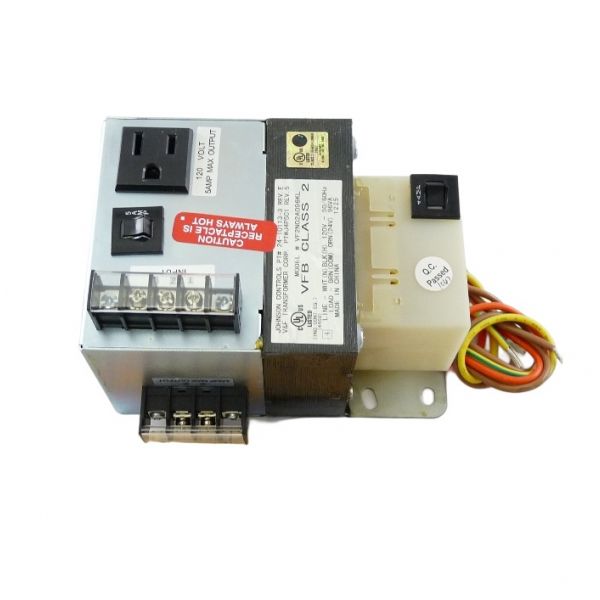
Johnson Controls PAN-PWRSP Panel Power Supply Transformer 96 VA

Special Price $198.98 Regular Price $228.83
Out of stock
SKU
PAN-PWRSP
The Johnson Controls PAN-PWRSP Panel Power Supply Transformer is an essentialpart of HVAC and building automation systems that provide constant power. It provides a stable 24 VAC output and the input voltage acceptance range of 120/208/240 VAC to convert electrical input into a robust 96 VA power output. The transformer does a great job by stabilizing the power so that HVAC systems and equipment can work without any problem for control panels, actuators and other significant parts. It is highly durable and compact thus suitable for use in so many situations enhancing the durability and efficiency of the system.
https://www.partshnc.com/media/catalog/product/p/a/pan-pwrsp.jpg

Specifications

  • Power Rating: 96 VA
  • Input Voltage: 120/208/240 VAC
  • Output Voltage: 24 VAC
  • Weight: 6.46lbs
Manufacturer Name: Johnson Controls
Product Number: PAN-PWRSP
OEM Part Number: PAN-PWRSP
Product Description: Panel Power Supply 96Va.Trans
Weight:6.46lbs/2930.2g

Choose the best HVAC equipment parts and supplies from PartsHnC!

  • Same Day Shipping

  • Best Quality And Best Price

  • Wide Range of Inventory

  • Best Customer Service

Have More Questions or Need Help to Place The Order?
Reach us at (866)773-0907 or [email protected]

Write Your Own Review
You're reviewing:Johnson Controls PAN-PWRSP Panel Power Supply Transformer 96 VA
Your Rating
Customer Questions
What maintenance is required for the Johnson Controls PAN-PWRSP Panel Power Supply Transformer?

Perform periodic inspection of wiring terminals, tighten loose connections, and remove dust buildup to prevent overheating. Verify output voltage stability and check for insulation wear. Regular checks help ensure accurate operation and reduce electrical faults and safety risks.

What are common issues with the Johnson Controls PAN-PWRSP Panel Power Supply Transformer?

  • Overheating under heavy load.
  • Transformer failure causing control panel shutdowns.
  • Output voltage fluctuation or drop.
  • Loose or corroded terminal connections.
  • Internal fuse failure or tripping.
  • Audible humming or vibration noise.
  • Short circuit due to insulation breakdown.
  • No output under surge conditions.

Installation Steps

Step 1: Turn off main power and verify zero voltage before installation carefully.

Step 2: Mount transformer on panel using screws securely aligned properly.

Step 3: Connect primary supply per wiring diagram as specified connections.

Step 4: Connect secondary to control circuit wiring.

Step 5: Secure grounding and check polarity for safety.

Step 6: Inspect wiring tightness and insulation for damage visible.

Step 7: Restore power and test output voltage under load gradually.