Facebook Pixel

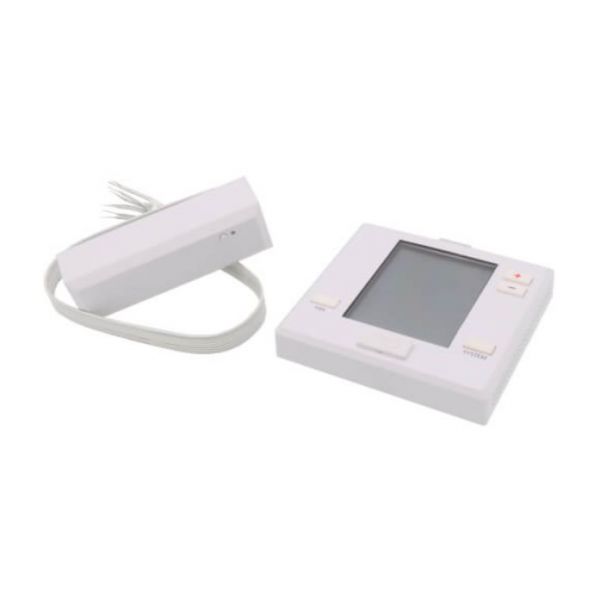
PRO 1 IAQ T731W PTAC Non-Programmable Wireless Thermostat

Special Price $148.90 Regular Price $171.24
In stock
SKU
T731W

The PRO 1 IAQ T731W Wireless PTACSTATNONPROG is a cutting-edge wireless thermostat intended for use with packaged terminal air conditioners. This innovative device is wireless, allowing for simple installation and positioning within the room. The T731W is compatible with a variety of HVAC equipment, including PTAC units commonly found in hotels, apartments, and commercial buildings. It improves climate control efficiency and comfort. Its non-programmable feature simplifies operation and makes it ideal for environments that require user-friendly controls. This thermostat improves indoor air quality and lowers energy consumption by offering precise temperature regulation and energy-saving capabilities, resulting in cost savings and improved environmental sustainability. The PRO 1 IAQ T731W Wireless PTACSTATNONPROG improves both comfort and efficiency.

https://www.partshnc.com/media/catalog/product/t/7/t731w.jpg
Manufacturer Name: PRO 1 IAQ
Product Number: T731W
OEM Part Number: T731W
Product Description: Wirelessptacstatnonprog
Weight:0.95lbs/430.91g

Choose the best HVAC equipment parts and supplies from PartsHnC!

  • Same Day Shipping

  • Best Quality And Best Price

  • Wide Range of Inventory

  • Best Customer Service

Have More Questions or Need Help to Place The Order?
Reach us at (866)773-0907 or [email protected]

Write Your Own Review
You're reviewing:PRO 1 IAQ T731W PTAC Non-Programmable Wireless Thermostat
Your Rating
Customer Questions
What maintenance is required for the PRO 1 IAQ T731W Wireless Thermostat?

Regularly clean the thermostat housing and sensor area to remove dust that can affect accuracy. Check battery levels if applicable and ensure secure wiring connections. Test wireless communication periodically and disconnect power before servicing for safety.

What are common issues with the PRO 1 IAQ T731W Wireless Thermostat?

  • Wireless signal interruptions.
  • Inaccurate temperature readings.
  • Failure to respond to manual adjustments.
  • Display or button malfunctions.

Installation Steps

Step1: Turn off power to the PTAC unit to prevent electrical shock.

Step2: Remove the existing thermostat from the wall or unit.

Step3: Mount the new thermostat base securely in the same location.

Step4: Connect the wires to the corresponding terminals on the new thermostat.

Step5: Attach the thermostat faceplate to the base.

Step6: Restore power to the PTAC unit and test the thermostat for proper operation.

Step7: Follow safety precautions, avoid touching live wires and ensure all connections are secure.