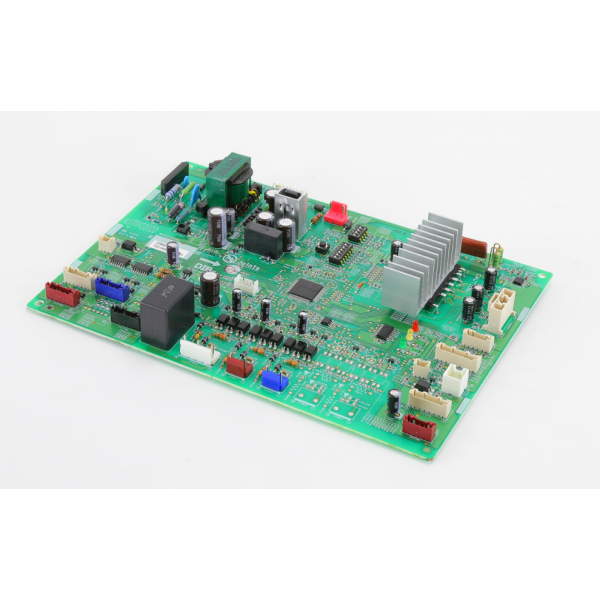
Mitsubishi Electric T2WF2Y451 Control Board
Specifications
- Temperature Range: 52°C
- Type: Control Board
- Length : 9"
- Width: 6 3/8"
- Height : 1 1/2"
- Weight: 0.87 Lbs
Loyalty ProgramMitsubishi Electric T2WF2Y451 is a printed circuit board (PCB) specifically designed for use in various Mitsubishi Electric air conditioners. It plays a vital role in maintaining efficient and reliable operations. Manages various aspects of the air conditioner's operation, including the compressor, fan, defrost cycles, and temperature control. Collects information from temperature sensors, pressure switches, and other components to monitor system performance and adjust operation accordingly. Interacts with the control panel and display, enabling users to adjust settings and monitor air conditioner status. The T2WF2Y451 Mitsubishi Electric Board helps in implementing safety features to prevent overheating, malfunction, and potential damage to internal components.
Key features:
A malfunctioning T2WF2Y451 board can lead to various issues with your Mitsubishi Electric air conditioner. Keep an eye out for these telltale signs:
Performance Problems:
Functional Issues:
Same Day Shipping
Best Quality And Best Price
Wide Range of Inventory
Best Customer Service
Q: What are some compatible Mitsubishi Electric air conditioner models for the T2WF2Y451 PCB?
A: Specific compatible models vary, so always refer to the manufacturer's specifications or consult a technician for confirmation. Don't rely on online information alone, as it might not be accurate or up-to-date.
Q: How much does a replacement board typically cost?
A: The cost of a Mitsubishi Electric board can vary depending on the model, supplier, and current market conditions. Contact a qualified technician or distributor for an estimated price quote.
Q: How can I maintain the T2WF2Y451 Mitsubishi Electric Board for optimal performance?
A: Schedule regular maintenance and inspections by a qualified HVAC technician to ensure proper operation, prevent component wear and tear, and identify potential issues early.
Step1: Turn off power to the unit at the breaker and confirm it’s off before touching anything.
Step2: Remove the access panel to expose the existing control board.
Step3: Take a photo or label each wire location so you can reconnect correctly.
Step4: Disconnect all wiring harnesses and mounting screws then remove the old board.
Step5: Place the new control board, secure it with screws, and reconnect all wiring to their labeled terminals.
Step6: Replace the access panel, restore power, and test the unit for proper operation.