Facebook Pixel

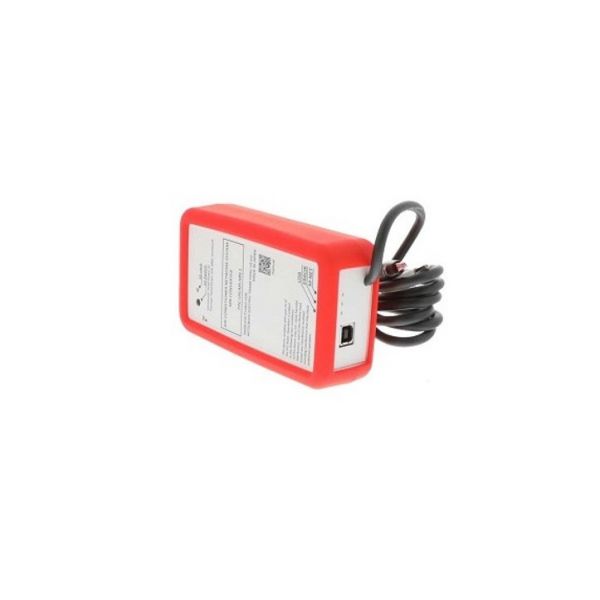
Mitsubishi Electric PAC-USCMS-MN-1 Maintenance Tool

Special Price $511.40 Regular Price $567.66
In stock
SKU
PAC-USCMS-MN-1
The Mitsubishi Electric PAC-USCMS-MN-1 Maintenance-Tool for HVAC systems It allows the HVAC specialists to perform extensive system , troubleshoot, and do normal maintenance with a lot of ease. This tool connects to the HVAC system through a connected connection in order to directly interact with the control board and sensors. The tool has an LCD screen where current and system including fault codes, status, and performance is displayed. It is most relevant where of a problem, and therefore system performance is required in addition to confirmation of impeccable functionality and optimal performance. The Mitsubishi Electric Maintenance Tool for HVAC technicians as it contains a lot of features and a platform to facilitate of HVAC products.
Manufacturer:

https://www.partshnc.com/media/catalog/product/p/a/pac-uscms-mn-1.jpg

Specifications

  • Temperature Range: 32°F to 122°F
  • Type: Maintenance Tool
  • Connectivity: Wired
  • Display Type: LCD
  • Material: Silicon
  • Weight: 0.5 Lbs

PAC-USCMS-MN-1 Mitsubishi Electric MN Converter

The PAC-USCMS-MN-1, commonly referred to as the Mitsubishi Electric MN Converter, stands as a multifaceted solution catering to the service and upkeep of Mitsubishi Electric CITY MULTI VRF systems. This device significantly enhances efficiency and performance, offering swift issue identification to minimize downtime and optimize overall operation. Troubleshooting is simplified with access to comprehensive data and diagnostics, ensuring accurate problem resolution. The PAC-USCMS-MN-1 Mitsubishi Electric MN converter also contributes to reduced maintenance costs by enabling proactive monitoring and adjustments, thereby preventing major system failures and extending the lifespan of equipment. Furthermore, its capabilities extend to enhanced data analysis, allowing for the recording of data for prolonged performance monitoring and systematic optimization.

Key features:

  • Dual Functionality: Operates in both maintenance mode and standalone logging mode.
  • USB Connectivity: Transfers data and interacts with the Maintenance Tool software on a computer.
  • SD Card Slot: Enables standalone data logging and storage for later retrieval.
  • LED Indicators: Provide visual feedback on connection status and system operation.
  • Compact and Portable: Easy to carry and use on the job site.
  • Broad Compatibility: Works with various CITY MULTI VRF models from Mitsubishi Electric.

Signs of faulty Mitsubishi Electric MN Converter

  • Unable to connect to a computer: Check for secure USB cable connection and try different ports. Consider software compatibility issues or driver updates.
  • No communication with the CITY MULTI system: Verify proper connection to the indoor unit's CN105 terminal and ensure power supply is adequate.
  • Intermittent data transfer: Loose connections, software glitches, or hardware malfunctions could cause data drops.
  • Maintenance Tool software malfunctioning: Crashing, freezing, or displaying inaccurate data might indicate internal software issues or compatibility problems.
  • Inability to access or analyze system parameters: This could be due to hardware faults within the MN Converter or communication issues with the CITY MULTI system.
  • Data logging not happening: Check if the SD card is inserted correctly and formatted appropriately. Internal memory issues or software glitches could also be the culprit.
  • Damaged connectors or cables: Visible physical damage to the USB port, CN105 connection, or power supply cable could disrupt functionality.
  • Overheating: Excessive heat generation (especially near internal components) could indicate internal hardware stress or malfunction.
  • LED indicators behaving abnormally: Refer to the user manual for specific interpretations of LED status lights to identify potential error codes.
  • Sudden performance drops: If the MN Converter used to work well but now exhibits consistent issues, it's worth investigating potential internal malfunctions.
  • Unusual behavior: Erratic data recordings, unexpected system parameter readings, or unresponsive buttons could hint at hardware or software problems.

Choose the best HVAC equipment parts and supplies from PartsHnC!

  • Same Day Shipping

  • Best Quality And Best Price

  • Wide Range of Inventory

  • Best Customer Service

Have More Questions or Need Help to Place The Order?
Reach us at (866)773-0907 or [email protected]

Write Your Own Review
You're reviewing:Mitsubishi Electric PAC-USCMS-MN-1 Maintenance Tool
Your Rating
Customer Questions
No Questions

Installation Steps

Step1: Turn off power to the unit before use to avoid injury or damage.

Step2: Open the service panel on the Mitsubishi Electric HVAC system.

Step3: Connect the maintenance tool to the designated service port or wiring harness.

Step4: Follow the manufacturer’s interface prompts to run diagnostics or maintenance tasks.

Step5: Disconnect tool, close panel, and restore power.