Facebook Pixel

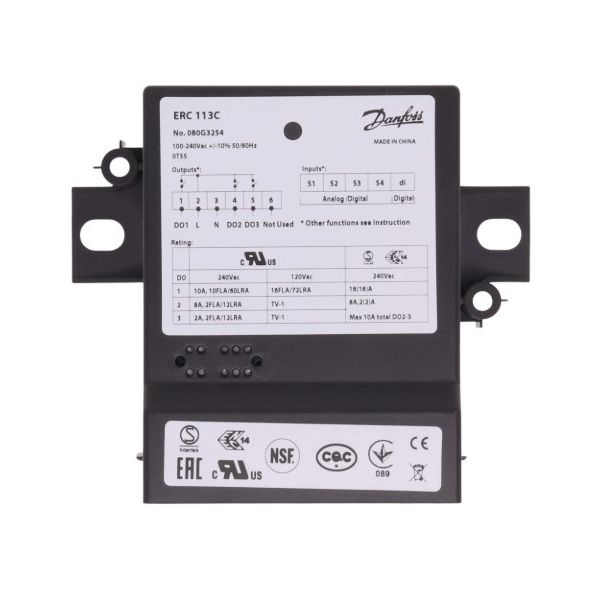
Danfoss 080G3254 GDM ERC113C Refrigeration Controller Command Module

Special Price $91.23 Regular Price $104.91
In stock
SKU
080G3254
The Danfoss 080G3254 Refrigeration Controller Command Module GDM is an intelligent electronic tool that is employed to manage refrigeration units. This type of controller comes with 240V in operation power supply and has power frequency of either (50/60)Hz it’s an essential factor in controlling temperature inside the refrigerator. These models are the ERC113C type controller with a small working capacity of 0.625 litre that makes it possible to install the controller in any given HVAC systems. This module is generally applied in mostly commercial fridges that include Freezers, Walk-In Coolers, Show Cabinets.
https://www.partshnc.com/media/catalog/product/0/8/080g3254.jpg

Specifications

  • Voltage: 240V
  • Frequency: 50/60 Hz
  • Volume: 0.625 Liter
  • Type: ERC113C
  • Weight: 0.24lbs
Manufacturer Name: Danfoss
Product Number: 080G3254
OEM Part Number: 080G3254
Product Description: Erc113c Gdm Comm. Module
Weight:0.24lbs/108.86g

Choose the best HVAC equipment parts and supplies from PartsHnC!

  • Same Day Shipping

  • Best Quality And Best Price

  • Wide Range of Inventory

  • Best Customer Service

Have More Questions or Need Help to Place The Order?
Reach us at (866)773-0907 or [email protected]

Write Your Own Review
You're reviewing:Danfoss 080G3254 GDM ERC113C Refrigeration Controller Command Module
Your Rating
Customer Questions
What maintenance is required for the Danfoss 080G3254 GDM ERC113C Controller Command Module?

Regularly inspect the controller for dust, moisture, and loose wiring connections. Ensure the display and buttons are clean and functioning. Verify firmware is up to date if applicable. Proper maintenance ensures accurate temperature control and accurate system operation.

What are common issues with the Danfoss 080G3254 GDM ERC113C Controller Command Module?

  • Display or interface failures.
  • Erratic or incorrect temperature readings.
  • Connection problems causing intermittent signal or power loss.
  • Fault codes or unresponsive control functions.

Installation Steps

Step 1: Turn off all power to the unit to ensure safety.

Step 2: Remove the access panel to expose the existing controller module.

Step 3: Disconnect all wiring from the old module, labeling connections if needed.

Step 4: Unscrew and remove the old module carefully.

Step 5: Position the new module in place and secure it with screws.

Step 6: Reconnect all wires, replace the panel, restore power, and test the system.