Facebook Pixel

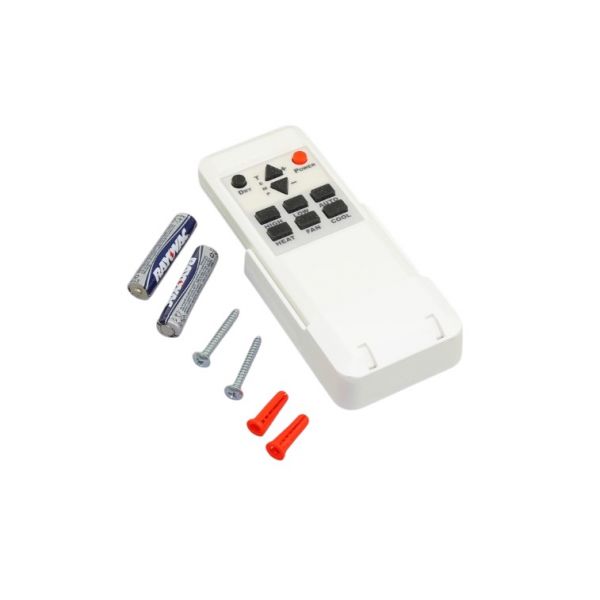
Utica-Dunkirk 240003455 EMI Remote Display

Special Price $149.10 Regular Price $171.47
In stock
SKU
240003455

The Utica-Dunkirk 240003455 Emi Remote Display is a pioneering addition to HVAC systems that aims to improve the user experience. This remote display, with its compact appearance and efficient performance, readily connects with a variety of HVAC settings, including Utica-Dunkirk models, providing intuitive control and monitoring features. Thanks to its intuitive interface, users can easily monitor performance, make changes to settings, and resolve difficulties from a distance. This device's resilience-engineered design guarantees dependable functioning in a variety of settings. The Utica-Dunkirk 240003455 Emi Remote Display enhances energy efficiency, reduces downtime, and improves system performance by allowing remote access to vital HVAC tasks, making it an indispensable asset in both residential and commercial settings.

https://www.partshnc.com/media/catalog/product/2/4/240003455.jpg

Manufacturer Name: Utica-Dunkirk
Product Number: 240003455
OEM Part Number: 240003455
Product Description:  The Utica-Dunkirk 240003455 EMI Remote Display is a replacement part for certain Utica-Dunkirk water heaters. It is a small, electronic device that provides information about the operation of the water heater, such as the water temperature, the current cycle, and any error codes. The display is mounted on the front of the water heater and is powered by the water heater's control board. If your Utica-Dunkirk water heater's EMI Remote Display is not working properly, you can replace it with the 240003455 part. To do this, you will need to disconnect the power to the water heater and remove the old display. Then, you can install the new display and reconnect the power.

Here are some of the symptoms that may indicate that your Utica-Dunkirk water heater's EMI Remote Display needs to be replaced:

  • The display is blank or unreadable.
  • The display shows incorrect information, such as the wrong water temperature or cycle.
  • The display is flickering or has other visual anomalies.
  • The display is making strange noises.
  • The display is not responding to button presses.

If you notice any of these symptoms, it is important to have the EMI Remote Display replaced as soon as possible. A malfunctioning display can prevent you from properly operating your water heater, which could lead to safety hazards or damage to the water heater, boilers, and furnaces.


Weight:0.31lbs/140.61g

Choose the best HVAC equipment parts and supplies from PartsHnC!

  • Same Day Shipping

  • Best Quality And Best Price

  • Wide Range of Inventory

  • Best Customer Service

Have More Questions or Need Help to Place The Order?
Reach us at (866)773-0907 or [email protected]


Write Your Own Review
You're reviewing:Utica-Dunkirk 240003455 EMI Remote Display
Your Rating
Customer Questions
Is programming the Utica-Dunkirk EMI remote display difficult?

Programming the remote display might require a basic understanding of heating systems and controls. The user manual provided with the display should guide you through the programming process.

Can I use the EMI remote display with other heating systems?

The Utica-Dunkirk 240003455 EMI remote display is designed for specific Utica-Dunkirk heating systems. Compatibility with other systems would depend on similarities in communication protocols and functionalities.

What should I do if the EMI remote display shows an error code?

Consult the user manual or any provided error code guide to understand the issue. If you can't troubleshoot the problem, contact a professional technician for assistance.

What maintenance is required for the Utica-Dunkirk 240003455 Remote Display?

Regularly wipe the display with a soft, dry cloth to remove dust. Inspect cables and connections for damage or looseness. Avoid exposure to moisture or extreme temperatures. Proper care ensures accurate readings and accurate operation.

What are common issues with the Utica-Dunkirk 240003455 Remote Display?

  • Display not powering on.
  • Flickering or unreadable screen.
  • Loose or damaged connection cables.
  • Inaccurate readings or signal loss.

Installation Steps

Step1: Turn off power to the HVAC system to ensure safety.

Step2: Remove the access panel or cover to access the control wiring.

Step3: Disconnect the existing remote display if present.

Step4: Mount the new EMI remote display in the desired location using the supplied hardware.

Step5: Connect the wiring according to the labeled terminals or installation diagram.

Step6: Secure all connections and replace any access panels or covers.

Step7: Restore power and test the remote display for proper operation.