Facebook Pixel

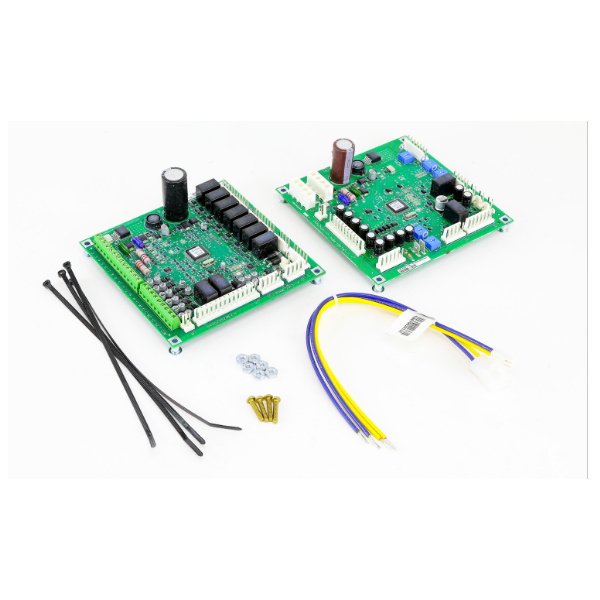
Trane KIT16268 EBM Fan Control With RTOM Board

Special Price $847.75 Regular Price $941.00
In stock
SKU
KIT16268
The Trane KIT16268 is a package that offers complete fan control for Trane HVAC systems only. ECM (Electronically Commutated Motor), is a kind of motor that is used for their less noise and energy consumption. The EBM fan control board controls the speed of these motors to maintain the right airflow in the system. The RTOM board (probably stands for Remote Temperature Operation Module) may be involved in controlling or at least observing the fan speed depending on temperature in various areas of the HVAC system. These components integrate to offer the better comfort and energy use in your Trane HVAC system.
https://www.partshnc.com/media/catalog/product/k/i/kit16268_trane_partshnc.png

Specifications

  • Height: 8.0"
  • Length: 9.0"
  • Width: 9.0"
  • Weight: 1.39lbs
Manufacturer Name: Trane
Product Number: KIT16268
OEM Part Number: KIT16268
Product Description: Ebm Fan Control W/ Rtom Board
Weight:1.39lbs/630.49g

Choose the best HVAC equipment parts and supplies from PartsHnC!

  • Same Day Shipping

  • Best Quality And Best Price

  • Wide Range of Inventory

  • Best Customer Service

Have More Questions or Need Help to Place The Order?
Reach us at (866)773-0907 or [email protected]

Write Your Own Review
You're reviewing:Trane KIT16268 EBM Fan Control With RTOM Board
Your Rating
Customer Questions
What maintenance is required for the Trane KIT16268 EBM Fan Control With RTOM Board?

Inspect the fan control and RTOM board assembly for dust buildup, overheating marks, or loose electrical connections. Ensure all wiring harnesses are secure and free from corrosion. Maintain proper airflow around the control compartment to prevent thermal stress and support stable electronic operation.

What are common issues with the Trane KIT16268 EBM Fan Control With RTOM Board?

  • Fan motor not responding to control signals.
  • Intermittent or erratic blower speed control.
  • RTOM communication errors causing system lockout.
  • Overheating of control board components.
  • Failure to initiate or stop fan operation properly.

Installation Steps

Step 1: Disconnect power supply and confirm unit is fully de-energized.

Step 2: Remove access panel and note existing wiring layout.

Step 3: Mount RTOM board and fan control assembly on designated bracket points.

Step 4: Reconnect all wiring harnesses according to terminal labels and diagram.

Step 5: Secure board firmly and replace protective cover.

Step 6: Restore power and check fan start, speed control, and normal system response.