Facebook Pixel

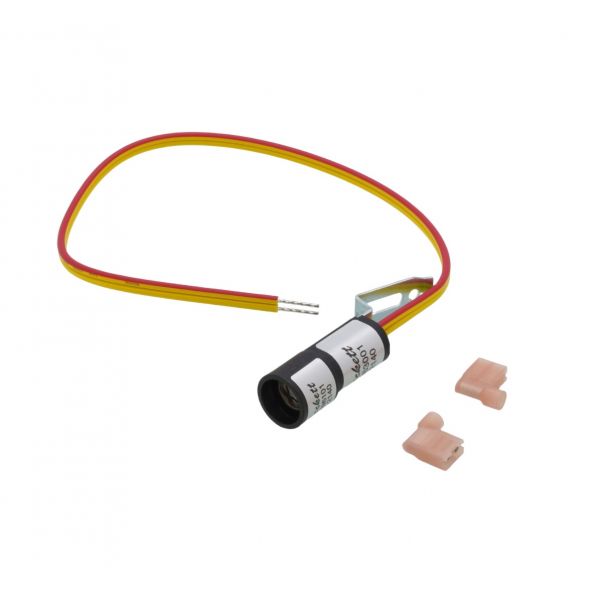
Honeywell C554A1687 Cadmium Sulfide Cell Kit 15" Leads 7006U

Special Price $35.91 Regular Price $46.68
In stock
SKU
C554A1687
The Honeywell C554A1687 Cad Cell Kit, with 15” leads, is an essential part of oil burner primary controls. This kit contains a cadmium sulfide photocell, or a “cad cell” which is used as a flame sensor. The cad cell’s resistance varies depending on whether light is coming from the oil burner flame or not. When the burner lights, the light from the flame lowers the cell’s resistance, which in turn tells the control to continue operation. If the flame is not produced, the resistance rises and the control turns off the burner to avoid a hazard. This product is installed mainly in the residential and commercial oil-fired furnaces and boilers to prevent fuel buildup in the event of failed ignition, which may lead to dangerous conditions.
Manufacturer:

https://www.partshnc.com/media/catalog/product/c/5/c554a1687_1.jpg

Specifications

  • Type: Cad Cell Kit
  • Lead Length: 15"
Manufacturer Name: Honeywell
Product Number: C554A1687
OEM Part Number: C554A1687
Product Description: Cad Cell Kit 15" Leads (7006U)
Weight:0.09lbs/40.82g

Choose the best HVAC equipment parts and supplies from PartsHnC!

  • Same Day Shipping

  • Best Quality And Best Price

  • Wide Range of Inventory

  • Best Customer Service

Have More Questions or Need Help to Place The Order?
Reach us at (866)773-0907 or [email protected]

Write Your Own Review
You're reviewing:Honeywell C554A1687 Cadmium Sulfide Cell Kit 15" Leads 7006U
Your Rating
Customer Questions
What maintenance is required for the Honeywell C554A1687 Cadmium Sulfide Cell Kit?

Keep the cadmium sulfide cell clean and free from dust or soot buildup to ensure accurate flame sensing. Inspect wiring connections for tightness and corrosion regularly. Handle the sensor carefully to avoid damage and ensure proper alignment for accurate operation in the burner assembly.

What are common issues with the Honeywell C554A1687 Cadmium Sulfide Cell Kit?

  • Dirty sensor causing flame detection failure.
  • Weak or no signal leading to ignition lockout.
  • Wiring damage or loose connections.
  • Sensor aging reducing sensitivity.
  • Intermittent shutdown of heating system.

Installation Steps

Step 1: Shut off electrical power and oil burner fuel supply before starting work to prevent fire or shock hazards.

Step 2: Remove burner cover and locate the existing cad cell assembly inside the air tube area.

Step 3: Disconnect old sensor leads and carefully remove the worn cadmium sulfide cell.

Step 4: Install new cell kit, ensuring clear line-of-sight to flame and correct bracket placement.

Step 5: Reconnect lead wires to the primary control terminals securely.

Step 6: Restore power and fuel, then observe burner ignition and stable flame detection operation.