Facebook Pixel

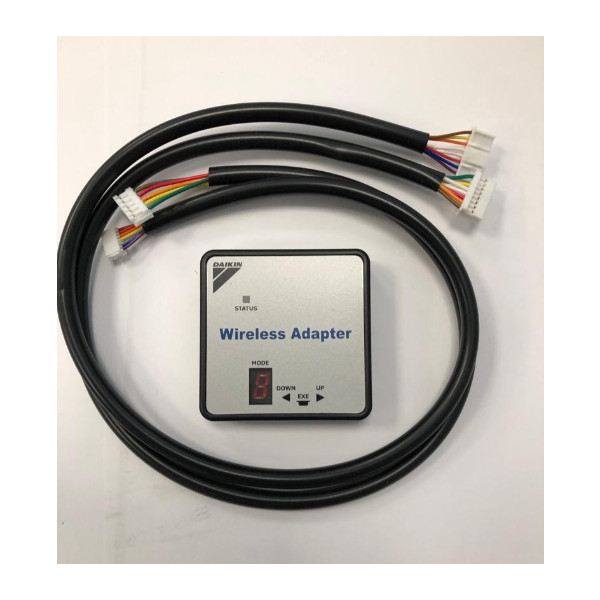
Daikin-McQuay 999187T Bluetooth Adapter

Special Price $561.10 Regular Price $622.82
In stock
SKU
999187T
The Daikin-McQuay 999187T Bluetooth Adapter is a wireless communication part which is used to add more functionality to the HVAC systems that have compatibility. Through wireless connectivity to an Android or iOS-based smartphone or tablet and the use of a specific application, the adapter allows users to oversee and manage numerous parameters of their HVAC system from a distance. This encompasses setting temperatures, time programming, control of energy use and receiving of real-time system status. The adapter provides numerous advantages like convenience and energy saving. They can easily change the temperature settings from the comfort of their office, car or any other place within Bluetooth range to ensure they are comfortable.
Manufacturer:

https://www.partshnc.com/media/catalog/product/9/9/999187t_daikin-mcquay_partshnc.jpg

Specifications

  • Type: Bluetooth Adapter
    Manufacturer Name: Daikin-McQuay
    Product Number: 999187T
    OEM Part Number: 999187T
    Product Description: Bluetooth Adapter
    Weight:0.31lbs/140.61g

    Choose the best HVAC equipment parts and supplies from PartsHnC!

    • Same Day Shipping

    • Best Quality And Best Price

    • Wide Range of Inventory

    • Best Customer Service

    Have More Questions or Need Help to Place The Order?
    Reach us at (866)773-0907 or [email protected]

    Write Your Own Review
    You're reviewing:Daikin-McQuay 999187T Bluetooth Adapter
    Your Rating
    Customer Questions
    What maintenance is required for the Daikin-McQuay 999187T Bluetooth Adapter?

    Keep the adapter clean and free from dust or moisture. Check connections periodically to ensure secure attachment. Avoid exposing it to extreme temperatures or liquids. Proper handling ensures stable wireless performance and prevents connectivity issues.

    What are common issues with the Daikin-McQuay 999187T Bluetooth Adapter?

    • Connectivity drops or pairing failures.
    • Interference from nearby electronic devices.
    • Firmware incompatibility or outdated software.
    • Physical damage to ports or casing.

    Installation Steps

    Step 1: Turn off power to the unit before installation to avoid electrical hazards.

    Step 2: Locate the designated port or connector for the adapter.

    Step 3: Insert the Bluetooth adapter securely into the port.

    Step 4: Ensure it is firmly seated and properly aligned.

    Step 5: Restore power and enable Bluetooth settings on the system.

    Step 6: Pair the adapter with the device and verify proper connectivity.