Facebook Pixel

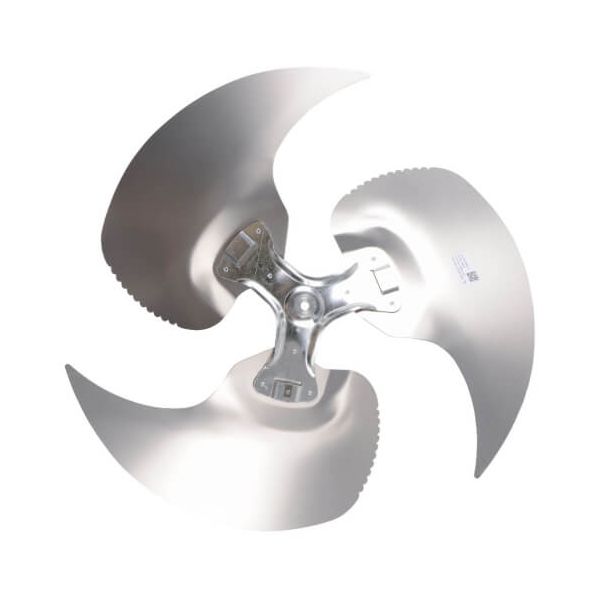
Lennox 85M49 3-Blade Fan 26" DIA 1/2" Bore

Special Price $388.79 Regular Price $431.55
In stock
SKU
85M49
The Lennox 85M49 3-Blade Fan provides airflow movement support for equipment operation. This fan helps move air through the system by rotating and creating the required airflow during operating cycles. It operates as a fan component with a 3-blade design, 26" diameter, and 1/2" bore size to match the required installation arrangement. The part is installed within compatible equipment during service or replacement work. It helps maintain proper air circulation, supports consistent airflow movement, and assists with the intended operation of connected system components.
Manufacturer:

https://www.partshnc.com/media/catalog/product/8/5/85m49_lennox_partshnc.jpg

Specifications

  • Weight:6lbs
  • Measure:Unit
  • Diameter: 26 Inches
  • Number of Blades: 3
  • Blade Pitch: 24 degrees
  • Rotation: Counter-ClocKWise
  • Hub:Opposite Discharge Side
  • Material:Galvanized Steel
  • Hub Type:Fixed
  • Type:Swept Wing Condenser Fan Blade
Manufacturer Name: Lennox
Product Number: 85M49
OEM Part Number: 85M49
Product Description: 1/2"Bore 26"Dia 3Blade Fan
Weight:6lbs/2721.55g

Choose the best HVAC equipment parts and supplies from PartsHnC!

  • Same Day Shipping

  • Best Quality And Best Price

  • Wide Range of Inventory

  • Best Customer Service

Have More Questions or Need Help to Place The Order?
Reach us at (866)773-0907 or [email protected]

Write Your Own Review
You're reviewing:Lennox 85M49 3-Blade Fan 26" DIA 1/2" Bore
Your Rating
Customer Questions
What maintenance is required for the Lennox 85M49 Fan Blade?

Keep the fan blades clean and free of dust buildup to maintain balanced airflow and reduce strain on the motor. Regularly inspect the bore connection for looseness or wear. Tighten fittings and check alignment to prevent vibration. Always disconnect power before servicing to ensure safety.

What are common issues with the Lennox 85M49 Fan Blade?

  • Blade imbalance causing vibration and noise during operation.
  • Reduced airflow due to dirt accumulation on blades.
  • Loosening at the bore connection leading to instability.
  • Motor strain or overheating from restricted or uneven fan rotation.

Installation Steps

Step 1: Turn off power and ensure the unit is completely stopped.

Step 2: Remove the old fan guard or top panel to access the blade.

Step 3: Loosen the hub set screw and slide the old fan off the shaft.

Step 4: Align and install the new fan onto the motor shaft.

Step 5: Tighten the set screw securely and reinstall the guard.

Step 6: Restore power, and test for smooth, balanced operation.