
Facebook Pixel

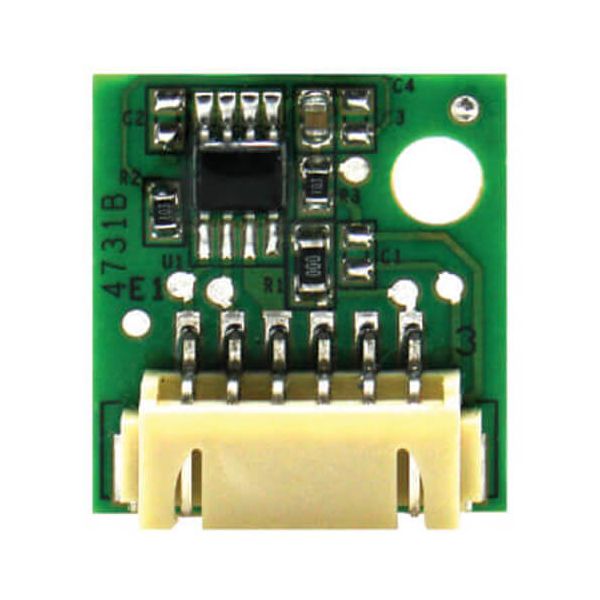
Rheem-Ruud 47-104778-03 Model Data Memory Card

Special Price $17.85 Regular Price $23.20
In stock
SKU
47-104778-03
The Rheem-Ruud 47-104778-03 Model Data Memory Card is an electronic storage component used to store operational and configuration data used to control HVAC systems. It is programmed with the model-specific parameters, and it communicates with the element control board to give the necessary configuration parameters. When programmed into the control interface, the card enables the control circuitry to read stored information that is used to direct system operation and configuration recognition. It is fitted into the slot of the control board or electronic control compartment to allow the equipment controller to read and use the model.
Manufacturer:

https://www.partshnc.com/media/catalog/product/4/7/47-104778-03_rheem-ruud_partshnc.jpg
Manufacturer Name: Rheem-Ruud
Product Number: 47-104778-03
OEM Part Number: 47-104778-03
Product Description: Model Data Memory Card
Weight:0.05lbs/22.68g

Choose the best HVAC equipment parts and supplies from PartsHnC!

  • Same Day Shipping

  • Best Quality And Best Price

  • Wide Range of Inventory

  • Best Customer Service

Have More Questions or Need Help to Place The Order?
Reach us at (866)773-0907 or [email protected]

Write Your Own Review
You're reviewing:Rheem-Ruud 47-104778-03 Model Data Memory Card
Your Rating
Customer Questions
What maintenance is required for the Rheem-Ruud 47-104778-03 Model Data Memory Card?

Keep the memory card clean, dry, and free from dust or corrosion to ensure accurate data retention. Inspect contacts periodically for oxidation or looseness. Ensure proper seating in the control board during installation. Avoid static discharge and power surges when handling or servicing.

What are common issues with the Rheem-Ruud 47-104778-03 Model Data Memory Card?

  • Corrupted or unreadable configuration data causing system faults.
  • Poor connection leading to intermittent operation or startup failure.
  • Physical contact corrosion resulting in communication errors.
  • Compatibility or recognition issues after control board replacement.

Installation Steps

Step 1: Turn off all power to the HVAC system and check no voltage is present.

Step 2: Access the control board compartment by removing the service panel.

Step 3: Locate the memory card slot on the main control board.

Step 4: Carefully remove the old memory card without bending pins or damaging the socket.

Step 5: Insert the new card firmly into the slot, ensuring correct alignment.

Step 6: Reinstall the access panel and restore power to the unit.

Step 7: Test system startup and confirm proper configuration recognition and operation.