Facebook Pixel

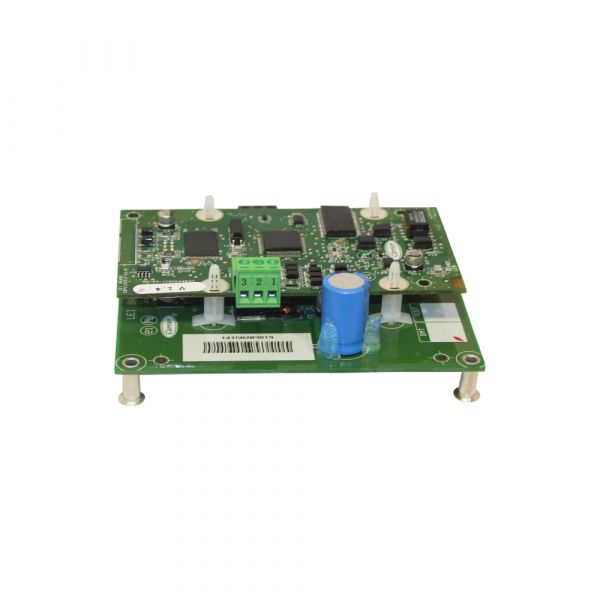
Carrier 33CNTRAN485-01-R Bacnet Modbus Translator

Special Price $3,007.09 Regular Price $3,337.87
In stock
SKU
33CNTRAN485-01-R
The Carrier 33CNTRAN485-01-R Bacnet Modbus Translator functions in converting between Bacnet and Modbus protocol when used in HVAC systems. More specifically, it works as a converter between Bacnet and Modbus, two well-known protocols in building automation. This makes it possible to transfer data between incompatible devices and makes monitoring and control centralized. This translator is especially useful on premises with Carrier and non-Carrier equipment with different protocol arrangements. This has a small form factor of 5.1” in length, 4” in width and 2.3” in height to fit on an equipment cabinet.
Manufacturer:

https://www.partshnc.com/media/catalog/product/3/3/33cntran485-01-r_carrier_partshnc.jpg

Specifications

  • Length: 5.1 "
  • Width: 4 "
  • Height: 2.3 "
  • Weight: 3.7lbs
Manufacturer Name: Carrier
Product Number: 33CNTRAN485-01-R
OEM Part Number: 33CNTRAN485-01-R
Product Description: Bacnet Modbus Translator
Weight:0.45lbs/204.12g

Choose the best HVAC equipment parts and supplies from PartsHnC!

  • Same Day Shipping

  • Best Quality And Best Price

  • Wide Range of Inventory

  • Best Customer Service

Have More Questions or Need Help to Place The Order?
Reach us at (866)773-0907 or [email protected]

Write Your Own Review
You're reviewing:Carrier 33CNTRAN485-01-R Bacnet Modbus Translator
Your Rating
Customer Questions
What maintenance is required for the Carrier 33CNTRAN485-01-R Bacnet Modbus Translator?

Regularly inspect wiring connections and communication ports to ensure stable data transmission. Keep the system clean and free from dust or moisture. Verify firmware updates and network settings periodically. Always power down safely before servicing to prevent electrical damage or communication faults.

What are common issues with the Carrier 33CNTRAN485-01-R Bacnet Modbus Translator?

  • Communication errors between Bacnet and Modbus systems.
  • Intermittent or lost data signals.
  • System failing to power on correctly.
  • Faulty or loose network connections.

Installation Steps

Step 1: Ensure power is off before installation to prevent electrical shock.

Step 2: Mount the translator securely near HVAC or building automation system.

Step 3: Connect the Modbus and BACnet wiring according to the wiring diagram.

Step 4: Verify communication protocol settings match your system requirements.

Step 5: Power on the device and check status LEDs for proper operation.

Step 6: Test data exchange between BACnet and Modbus devices.