
Facebook Pixel

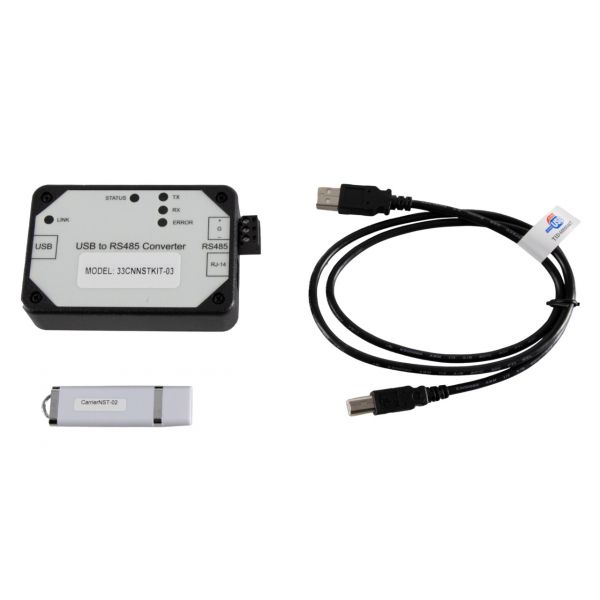
Carrier 33CNNSTKIT03 Network Service Tool V Kit

Special Price $3,043.47 Regular Price $3,378.25
Out of stock
SKU
33CNNSTKIT03
The Carrier 33CNNSTKIT03 is a Network Service Tool Kit V, which is a system for servicing Carrier HVAC equipment. Specifically, the nature of the contents of the kit is not quite clear but it can be understood that hardly general tools and various hardware and software equipment are accumulated in the kit to be used for diagnosing, setting up, fine-tuning, or routine maintenance of Carrier systems. These might include things such as communications leads, software interfaces, or small screwdriver-type tools used to get to specific internal parts. Since network service is at the central stage of the kit, it most probably contains tools for connecting to Carrier equipment via computer interfaces or applications for mobile devices.
Manufacturer:

https://www.partshnc.com/media/catalog/product/3/3/33cnnstkit03.jpg

Specifications

  • Length: 10 "
  • Width: 2 "
  • Height: 7 "
  • Weight: 0.61lbs
Manufacturer Name: Carrier
Product Number: 33CNNSTKIT03
OEM Part Number: 33CNNSTKIT03
Product Description: Network Service Tool V Kit
Weight:0.61lbs/276.69g

Choose the best HVAC equipment parts and supplies from PartsHnC!

  • Same Day Shipping

  • Best Quality And Best Price

  • Wide Range of Inventory

  • Best Customer Service

Have More Questions or Need Help to Place The Order?
Reach us at (866)773-0907 or [email protected]

Write Your Own Review
You're reviewing:Carrier 33CNNSTKIT03 Network Service Tool V Kit
Your Rating
Customer Questions
What maintenance is required for the Carrier 33CNNSTKIT03 Network Service Tool V Kit?

Keep the tool clean and free from dust or moisture. Inspect cables and connectors for wear or damage before use. Store in a protective case, and avoid dropping or exposing the kit to extreme temperatures to ensure accurate and safe operation.

What are common issues with the Carrier 33CNNSTKIT03 Network Service Tool V Kit?

  • Faulty or loose cable connections.
  • Software communication errors.
  • Inaccurate readings or sensor issues.
  • Physical damage to components.

Installation Steps

Step 1: Power off HVAC system and isolate electrical supply before starting.

Step 2: Connect Network Service Tool V Kit to the designated service port.

Step 3: Attach communication cable between tool and controller interface securely.

Step 4: Power on tool and check LED indicators for proper status.

Step 5: Launch service software and select target device.

Step 6: Run diagnostics, then disconnect and secure all connections carefully.