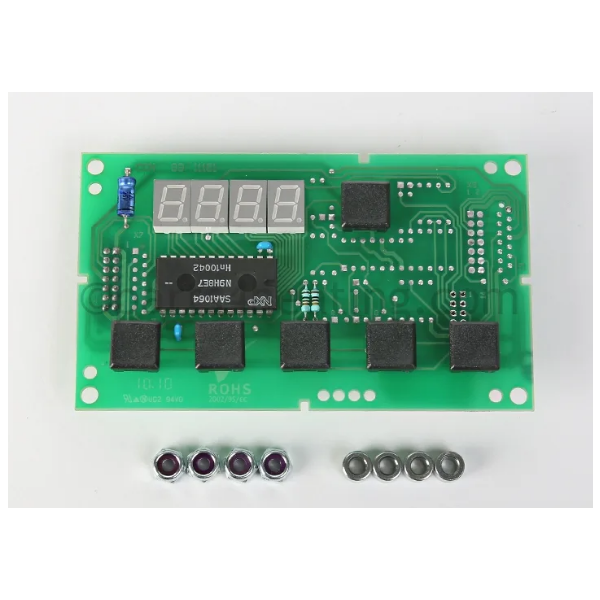
Velocity Boiler Works (Crown) 233061 Display Kit - BWC 070 Thru 425
Specifications
- Weight: 0.27 lbs
- Temperature Range: 32°F to 122°F
- Display Type: Digital
Loyalty ProgramThe Velocity Boiler Works (Crown) 233061 is a display board kit designed to replace a faulty or damaged display board in Crown boilers. It provides vital information about the boiler's operating status, including temperature, pressure, and error codes. This information helps users troubleshoot problems and maintain the boiler for optimal performance. Fixes a damaged or malfunctioning display board and restores the boiler's functionality. 233061 Velocity Boiler Works display kit provides accurate readings of boiler operation, allowing users to identify potential problems before they lead to safety hazards. Reduces maintenance costs with timely repairs Increases operational efficiency by providing accurate readings. It helps users optimize boiler settings for efficient operation and energy savings.
Key Features:
Same Day Shipping
Best Quality And Best Price
Wide Range of Inventory
Best Customer Service
Q: How do I install the display kit for Velocity Boiler Works?
A: It is recommended to refer to the manufacturer's instructions for detailed installation procedures. However, the process generally involves:
Q: How often should I inspect and maintain the 233061 Velocity Boiler Works display kit?
A: Regularly inspect the display board for any signs of damage or malfunction. Refer to the manufacturer's recommendations for specific maintenance intervals and procedures. Typically, cleaning the display with a soft, dry cloth is sufficient. Avoid using harsh chemicals or abrasive materials.
Q: What should I do if I suspect the display board kit is faulty?
A: If you suspect the display board is faulty, it is important to take immediate action.
Step1: Turn off power to the boiler and allow it to cool.
Step2: Remove the boiler’s access panel to reach the control area.
Step3: Disconnect wiring from the old display, labeling each wire for reference.
Step4: Remove the old display module.
Step5: Mount the new display kit and reconnect wires per labels or diagram.
Step6: Secure the display and replace the access panel.
Step7: Restore power and test the new display’s functionality.