
Facebook Pixel

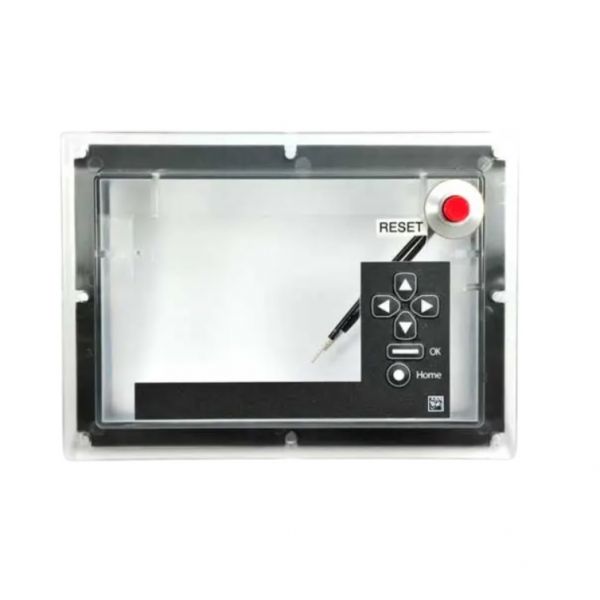
Honeywell 204729C NEMA 4 Cover W/Manual Reset

Special Price $291.68 Regular Price $323.77
In stock
SKU
204729C
The Honeywell 204729C Nema 4 Cover with Manual Reset is a protective enclosure for use with some Honeywell controls, especially those designed to be used in outdoor or harsh environments. The NEMA 4 specifically designed cover is designed to protect against water, dust, oil and other environmental contaminants. Typically it contains a manual reset switch within the enclosure to quickly and easily restore control system operation after power outage or other system disruption. Compared to an aquarium rated Nema 3, the Nema 4 rating offers additional protection against the elements, and is suitable for use on rooftop units, and any other HVAC system subject to hard weather conditions.
Manufacturer:

https://www.partshnc.com/media/catalog/product/2/0/204729c.jpg

Specifications

  • Type: Cover W/ Manual Reset
  • Enclosure: NEMA 4
Manufacturer Name: Honeywell
Product Number: 204729C
OEM Part Number: 204729C
Product Description: Nema 4 Cover W/ Manual Reset
Weight:0.72lbs/326.59g

Choose the best HVAC equipment parts and supplies from PartsHnC!

  • Same Day Shipping

  • Best Quality And Best Price

  • Wide Range of Inventory

  • Best Customer Service

Have More Questions or Need Help to Place The Order?
Reach us at (866)773-0907 or [email protected]

Write Your Own Review
You're reviewing:Honeywell 204729C NEMA 4 Cover W/Manual Reset
Your Rating
Customer Questions
What maintenance is required for the Honeywell 204729C Cover?

Regularly inspect the cover for cracks, corrosion, or loose fittings. Clean the surface to remove dust and debris, ensuring the manual reset operates smoothly. Proper maintenance prevents operational issues and protects internal components from moisture or damage.

What are common issues with the Honeywell 204729C Cover?

  • Manual reset mechanism sticking or failing.
  • Seal degradation causing moisture ingress.
  • Corrosion on metal surfaces.
  • Misalignment with enclosure openings.

Installation Steps

Step 1: Disconnect power to the control panel and verify zero voltage before starting.

Step 2: Remove existing cover or enclosure screws carefully.

Step 3: Align new cover with mounting holes and secure evenly.

Step 4: Ensure gasket is seated to maintain watertight seal.

Step 5: Reconnect wiring to manual reset mechanism per schematic.

Step 6: Restore power and test manual reset function.