Facebook Pixel

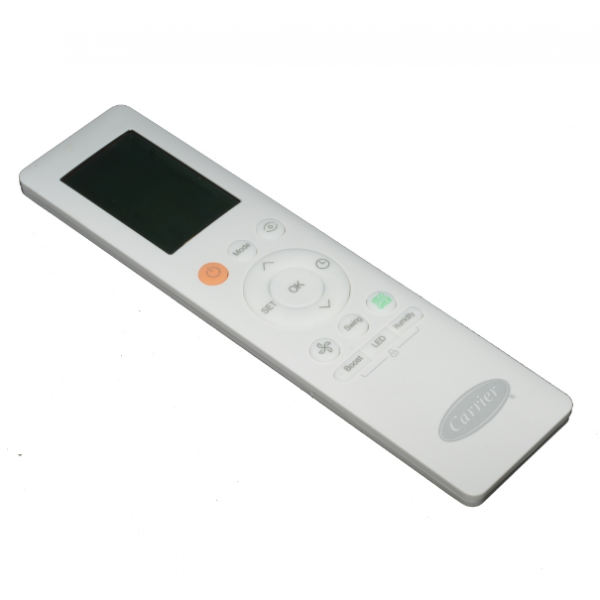
Carrier 17317000A59628 Remote Control

Special Price $62.21 Regular Price $71.54
In stock
SKU
17317000A59628
The Carrier 17317000A59628 is a remote control for Carrier HVAC systems. This comfortable remote easy to grip buttons for temperature adjustment and mode selection. Its white color blends in any home decor style. The remote then presents you with the ability to turn off or on your Carrier HVAC unit, and even adjust temperature, fan speed and operational mode from the security of your own couch or armchair simply by transmitting signals. This remote gives you the power to keep your environment comfortable while maximizing the efficiency of your Carrier HVAC system.
https://www.partshnc.com/media/catalog/product/1/7/17317000a59628_carrier_partshnc.jpg

Specifications

  • Length: 7.8 "
  • Width: 5 "
  • Height: 6.5 "
  • Color: White
  • Weight: 0.49lbs
Manufacturer Name: Carrier
Product Number: 17317000A59628
OEM Part Number: 17317000A59628
Product Description: Remote Control
Weight:0.49lbs/222.26g

Choose the best HVAC equipment parts and supplies from PartsHnC!

  • Same Day Shipping

  • Best Quality And Best Price

  • Wide Range of Inventory

  • Best Customer Service

Have More Questions or Need Help to Place The Order?
Reach us at (866)773-0907 or [email protected]

Write Your Own Review
You're reviewing:Carrier 17317000A59628 Remote Control
Your Rating
Customer Questions
What maintenance is required for the Carrier 17317000A59628 Remote Control?

Regularly clean the remote with a soft, dry cloth to remove dust and fingerprints. Check and replace batteries as needed to ensure proper operation. Avoid exposure to moisture or extreme temperatures to prevent damage. Store in a safe place to prevent drops or impacts that can break buttons.

What are common issues with the Carrier 17317000A59628 Remote Control?

  • Battery drain or failure.
  • Signal not reaching the unit.
  • Unresponsive or stuck buttons.
  • Physical damage from drops or impacts.

Installation Steps

Step1: Insert fresh batteries into the remote, observing correct polarity.

Step2: Power on the HVAC unit and ensure it’s in a controllable mode.

Step3: Aim the remote at the unit’s receiver and press the Mode button.

Step4: Follow on‑screen/setup prompts to pair with the system (check manual for model specifics).

Step5: Test basic functions (temperature, fan, on/off) to confirm successful pairing.