Facebook Pixel

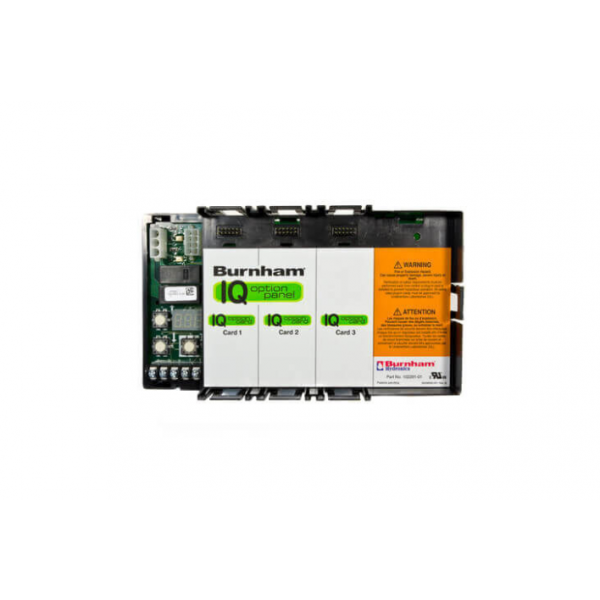
Burnham Boiler 109647-01 Control IQ Option Panel

Special Price $149.97 Regular Price $172.46
In stock
SKU
109647-01
The Burnham Boiler 109647-01 Control-IQ Option Panel for many of Burnham boilers to enhance its functioning. It also enhances consumers’ 1control over heating operations as a Control IQ Option Panel that incorporates enhanced control features into HVAC systems. It can only operate at 24V AC and has a temperature range of 20°F to 240°F. It serves more as a command hub where users may also view and manipulate any number of boiler functions like working modes, checkups, and temperature. By such a level of control, heating performance can be fine-tuned to the level of comfort and efficiency.
https://www.partshnc.com/media/catalog/product/1/0/109647-01_burnham-boiler_partshnc.png

Specifications

  • Type: Control IQ Panel: Compatibility: Burnham Boilers
  • Temperature: 20°F-240°F
  • Voltage: 24V AC
  • Weight: 0.97lbs
Manufacturer Name: Burnham Boiler
Product Number: 109647-01
OEM Part Number: 109647-01
Product Description: Control Iq Option Panel
Weight:0.97lbs/439.98g

Choose the best HVAC equipment parts and supplies from PartsHnC!

  • Same Day Shipping

  • Best Quality And Best Price

  • Wide Range of Inventory

  • Best Customer Service

Have More Questions or Need Help to Place The Order?
Reach us at (866)773-0907 or [email protected]

Write Your Own Review
You're reviewing:Burnham Boiler 109647-01 Control IQ Option Panel
Your Rating
Customer Questions
What maintenance is required for the Burnham Boiler 109647-01 Control IQ Option Panel?

Regularly inspect the panel for dust, moisture, or loose connections. Clean gently with a dry cloth and ensure all wiring is secure. Proper maintenance ensures reliable boiler operation and prevents error codes. Always turn off power to the boiler before servicing to avoid electrical hazards.

What are common issues with the Burnham Boiler 109647-01 Control IQ Option Panel?

  • Unresponsive or erratic control functions.
  • Display flickering or blank screen.
  • Loose or damaged electrical connections.
  • Error codes caused by communication failures.

Installation Steps

Step1: Turn off power to the boiler to prevent electrical shock.

Step2: Remove the existing panel by unscrewing mounting screws and disconnecting wiring.

Step3: Inspect the mounting area and clean any dust or debris.

Step4: Position the Control IQ Option Panel onto the mounting bracket.

Step5: Reconnect all wiring according to the panel’s terminal labels.

Step6: Secure the panel with screws, ensuring it is flush and stable.

Step7: Restore power and test the panel functions for proper operation.