Facebook Pixel

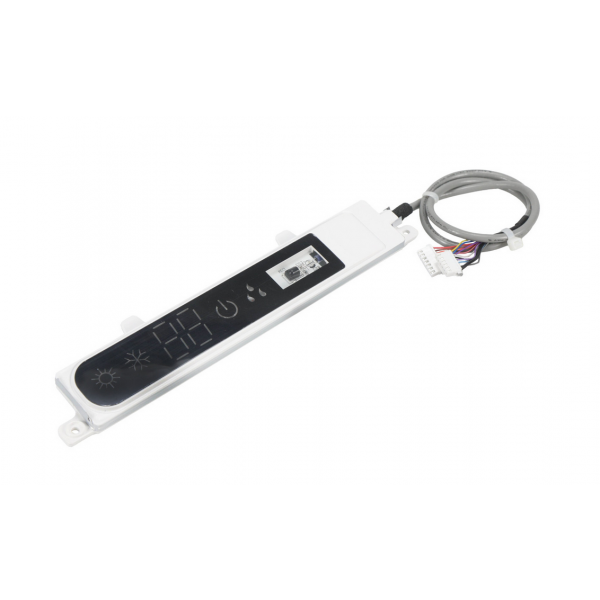
Nordyne 1008337 Display Board

Special Price $63.53 Regular Price $73.06
In stock
SKU
1008337
The Nordyne 1008337 Display Board is an essential component in HVAC systems, providing users with valuable information. Various operational data such as temperature, fan speed, and error codes can be found on the digital screen of this display board. It enables easy monitoring and control of the heating and cooling system, this makes it possible for users to make informed adjustments in order to enhance their comfort while conserving energy as well. In addition, its easy to use layout and clear markings make understand, particularly by ordinary people with no technical background. Nordyne HVAC functionality can be restored through replacement of damaged or an old display board thus elevating customer experience at large.
https://www.partshnc.com/media/catalog/product/1/0/1008337.png

Specifications

  • Type: Display Board
    Manufacturer Name: Nordyne
    Product Number: 1008337
    OEM Part Number: 1008337
    Product Description: Display Board
    Weight:0.23lbs/104.33g

    Choose the best HVAC equipment parts and supplies from PartsHnC!

    • Same Day Shipping

    • Best Quality And Best Price

    • Wide Range of Inventory

    • Best Customer Service

    Have More Questions or Need Help to Place The Order?
    Reach us at (866)773-0907 or [email protected]

    Write Your Own Review
    You're reviewing:Nordyne 1008337 Display Board
    Your Rating
    Customer Questions
    What maintenance is required for the Nordyne 1008337 Display Board?

    Inspect the display board periodically for dust accumulation, loose connectors, or signs of wear. Keep the unit clean and protected from moisture or extreme temperatures. Verify stable electrical connections and proper mounting. Always disconnect power before servicing to reduce electrical risk.

    What are common issues with the Nordyne 1008337 Display Board?

    • Blank or unresponsive display screen.
    • Flickering or dim display output.
    • Incorrect or missing information shown.
    • Failure to communicate with main control system.
    • Intermittent power or startup issues.

    Installation Steps

    Step 1: Turn off power at breaker and verify no voltage using a multimeter.

    Step 2: Remove access panel and carefully disconnect wiring, labeling each connection.

    Step 3: Unscrew and replace old display board with new unit, securing firmly.

    Step 4: Reconnect wiring according to schematic, ensuring proper terminal alignment.

    Step 5: Restore power, test display functions, and confirm normal HVAC operation.